Installing KindleForge
Yep, there’s an appstore for your jailbroken Kindle, and it has everything from KUAL, KOReader, an OTA Checker, Alpine Linux, and more!
If you encounter any issues while following this guide, you should join the KindleTweaks Discord Server for support.
Download The Latest Release
Extract the .zip File
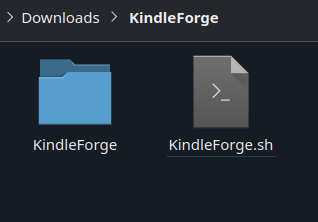
Extract the contents of the archive you just downloaded. You should end up with a KindleForge folder and a KindleForge.sh file.
If you only have a KindleForge folder, ensure that you didn't extract the archive's contents to a folder under the archive name.
Copying the Files to Your Kindle
Copy the KindleForge folder and KindleForge.sh file into your Kindle's documents folder.
Updating
You can check your version number by scrolling to the bottom of the KindleTweaks app.
Versions >= 4.0.9
- Open KindleForge.
- Click the 3 dots at the top of your screen.
- Click “Update KForge”.
Versions <= 4.0.8
- Delete the
KindleForgefolder. - Delete the
KindleForge.shfile. - Re-do the install instructions.
For any other issues, join the KindleTweaks Discord Server.
Credits
- MonkeyInPrivate - Wrote this page
- Penguins184 - Created KindleForge
- KindleForge Contributors - Made KindleForge possible
- Gingrspacecadet - Package manager (KFPM), inspiration & repository help
- ThatPotatoDev - ABI differentiation, dependencies, & tweak support